
Renewing a Policy From Another Company
A tenant already covered by another guarantor (such as TheGuarantors or Insurent) can be treated exactly like a PandaGuarantee renewal. They get our renewal discount and the option to pay…
On this page
A tenant already covered by another guarantor (such as TheGuarantors or Insurent) can be treated exactly like a PandaGuarantee renewal. They get our renewal discount and the option to pay monthly, the same as a tenant renewing one of our own policies.
In order to invite a tenant with a policy from another company to renew with PandaGuarantee, you use the same invite process as a normal applicant, which you can learn about here.
Eligibility
A lease qualifies as a renewal when the tenant is renewing at the same apartment and their current lease is already guaranteed by:
- PandaGuarantee
- TheGuarantors
- Insurent
- Any other institutional lease guarantor
The tenant still completes the standard application and underwriting. Renewal status changes the price and payment options, not the approval criteria.
How to send a renewal invite
- 1Start a new tenant invite from the landlord dashboard, as you would for any new lease.
- 2Complete steps 1 through 3 as normal (property, unit, lease, and tenant details).
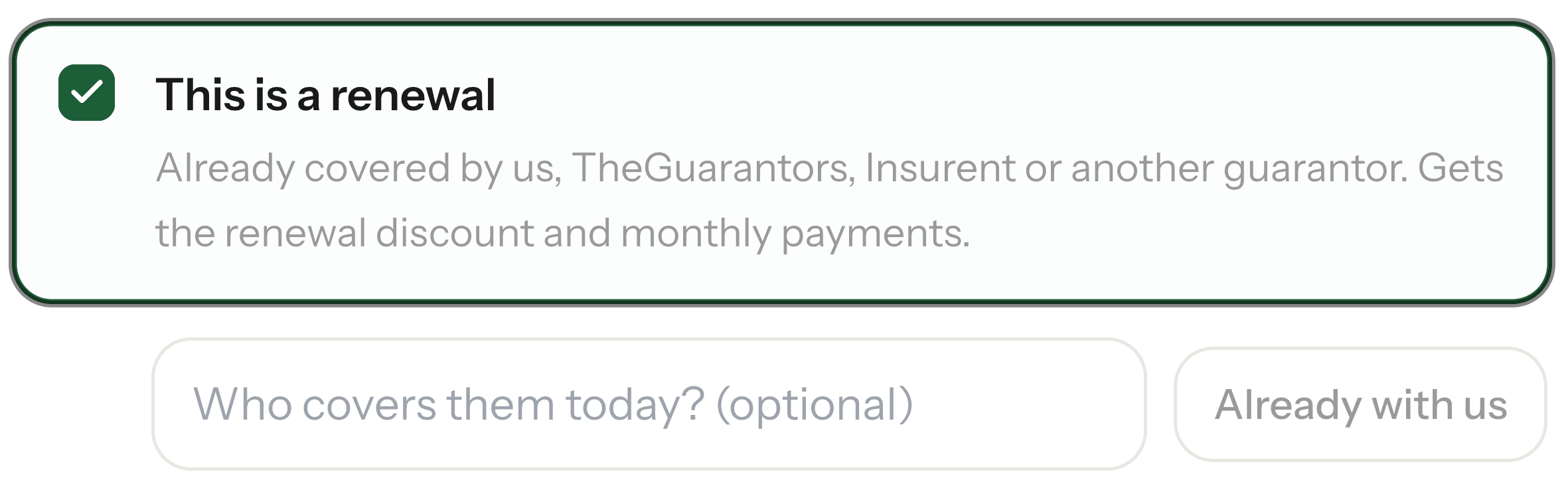
- 3On step 4, check This is a renewal.

- 4Enter the name of the tenant's current guarantor (e.g., TheGuarantors, Insurent). Enter PandaGuarantee if the tenant is already covered by us.
- 1Finish the remaining steps and send the invite.
- 2The tenant applies through the standard flow. Their quote reflects the renewal discount and offers monthly payments.
Didn't find what you needed?
Ask our team